Most brands do not have a user-generated content problem. They have a participation and workflow problem. The difference becomes obvious the moment a campaign moves beyond a few friendly customers and starts asking dozens, hundreds, or thousands of people to submit usable content. User-generated content at scale becomes an operational and participation problem.
On paper, the ask sounds simple: “Send us a video.” In practice, that request creates more friction than most teams expect. People do not always know what to say, where to send the file, how long the video should be, whether they need to sign something, or what the brand plans to do with the content afterward.
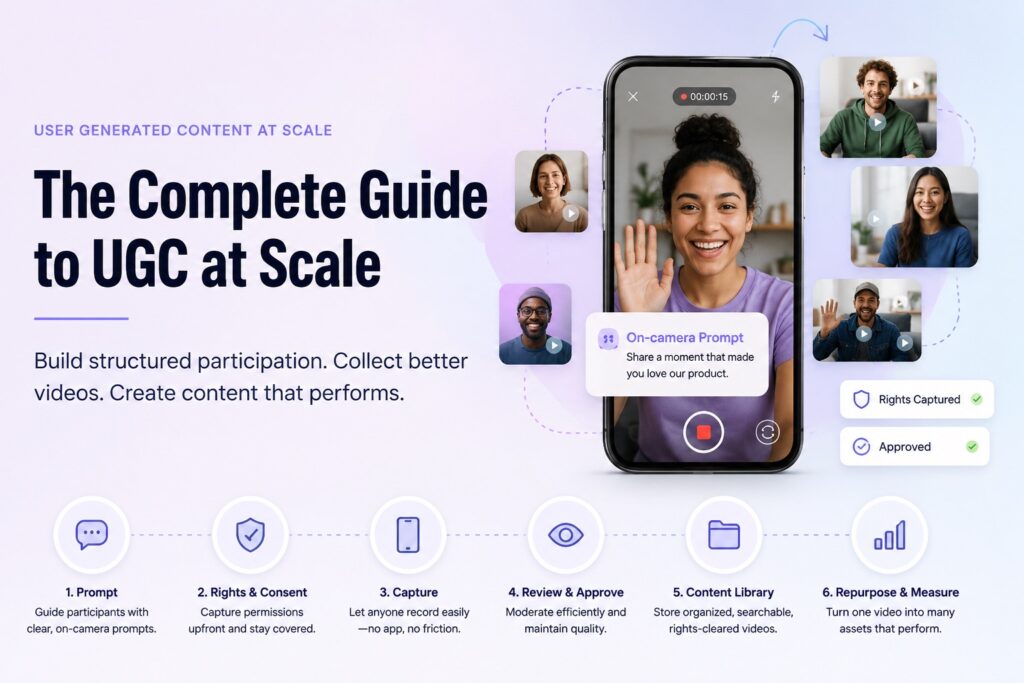
That is where user-generated content at scale often breaks down. Scale does not come from asking more people for content. It comes from designing a system that makes participation easy, gives people clear creative direction, captures permissions upfront, routes submissions into one place, and makes the best assets easy to review and reuse.
A hashtag is not that system. A shared drive is not that system. A form upload is usually not that system either. Those tools may help with collection, but they do not solve the bigger operating challenge: how to turn real participation into rights-cleared, brand-safe, usable content without overwhelming the team.
The brands that win with UGC are not always the brands with the biggest audience. They are the brands that make it easiest for the right people to participate in the right way. That is the core shift: UGC at scale is not just a content strategy. It is a participation system.
🚀 Executive Summary: UGC at Scale
Managing user generated content at scale is rarely a content problem, it is a workflow bottleneck. Most brands fail not because they lack submissions, but because they lack a system to capture, moderate, and license them.
- ✓ The Framework: Shift from “marketing tactics” to a repeatable 7-step Participation System (from Purpose to Measurement).
- ✓ The Friction Point: Why manual video collection kills ROI and how to automate rights-capture at the point of submission.
- ✓ AI Integration: Using AI for sentiment analysis and automated moderation to clear submission backlogs in seconds.
Keep reading to access: The exact operating checklist used by top agencies to manage 1,000+ video submissions without manual chaos.
Table of Contents
- What UGC at Scale Actually Means
- Why Most UGC Programs Break Down
- The UGC at Scale Framework
- 1. Purpose
- 2. The Creative Brief
- 3. Participation Flow
- 4. Permissions
- 5. Moderation
- 6. Repurposing
- 7. Measurement
- Why Video UGC Needs a Different Approach
- UGC Examples by Use Case
- What to Look for in a Collection System
- UGC Strategy for Agencies
- AI and the Future of UGC
- Operating Checklist
What user-generated content at scale actually means
User-generated content at scale does not mean collecting more random posts from the internet. It does not mean waiting for customers to tag a brand and hoping something useful appears. It also does not mean running a one-off hashtag campaign and calling every mention an asset.
At scale, UGC becomes a repeatable operating model. A brand, agency, or organization can invite participation from many people while still controlling the essentials: quality, permissions, moderation, organization, and reuse. The content may come from customers, fans, employees, event attendees, students, creators, or community members, but the workflow should remain clear and manageable.
This distinction matters because organic UGC and collected UGC are not the same thing. Organic UGC happens when people create content on their own terms. That can be valuable, but it is often hard to control, hard to approve, and hard to reuse. Collected UGC is designed around a specific participation moment, prompt, and submission flow.
Organic UGC is discovery. UGC at scale is designed participation.
That does not mean every video should feel scripted. Over-control can make UGC sound like brand copy, which defeats the point. But no structure creates a different problem. People hesitate, ramble, submit unclear videos, skip important details, or send content that the brand cannot confidently use.
At the heart of this system is the Prompt. In professional production, we call this a Creative Brief. For UGC, the prompt serves as a simplified creative brief for your customers, fans, or employees, giving them the necessary guardrails and inspiration to produce high-quality content without needing a film degree.
Good UGC systems remove the blank page without removing the human voice.
The goal is not to turn customers into performers. The goal is to remove the blank page. A good UGC system gives participants enough guidance to feel confident while still leaving room for their own voice, story, personality, and context.
A scaled program should answer practical questions before the campaign goes live. What are we collecting? Who are we asking? What do we want them to say, show, or react to? How will they record and submit? What permissions are required? Who reviews the content? Where does approved content go next?
Those questions may sound operational because they are. That is the part of the UGC strategy that many teams underbuild. They talk about authenticity, trust, community, and engagement, but those outcomes depend on the workflow underneath them.
Why most UGC programs break down
Most UGC programs break down because the creative idea gets more attention than the participation flow. A team decides it wants customer videos, fan reactions, employee stories, event clips, or community submissions. The idea is strong, but the system behind it is loose.
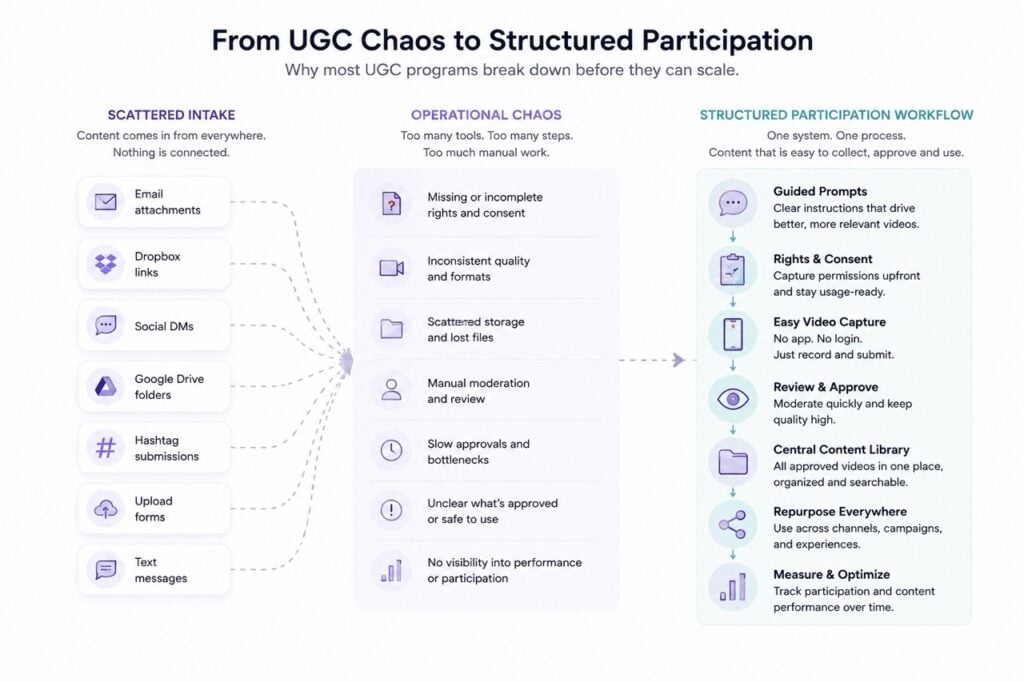
The result is usually a patchwork. Videos arrive through email, social DMs, shared folders, text messages, upload links, and tagged posts. Some submissions include names and permissions. Others do not. Some are vertical, some are horizontal, some are too long, some are too quiet, and some are strong but buried in an inbox.
That is not scale. That is content debt.
Most UGC workflows fail long before content quality becomes the problem. They fail at participation design.
The first breakdown is a lack of guidance. People may be willing to participate, but they often do not know what to say. “Tell us why you love the brand” sounds simple to a marketer, but to a customer staring at their phone, it can feel vague and awkward.
A better prompt gives shape without stealing the participant’s voice. “What problem were you trying to solve before using us?” is easier to answer than “Tell us your story.” “Show us your match-day ritual in ten seconds” is easier than “Submit a fan video.” “What surprised you most after your first week?” is stronger than “Review the product.”
The second breakdown is submission friction. Every extra step reduces the chance that someone finishes. If a participant has to download an app, create an account, record elsewhere, transfer a file, upload a large video, or complete a long form, many will abandon the process.
This abandonment is quiet. People rarely tell the brand they gave up. They simply do not submit, and the team is left wondering why participation was lower than expected.
The third breakdown is unclear rights. A team may collect a great video and still hesitate to use it because consent was not captured properly. Can the brand post it on social? Use it in paid media? Add it to a product page? Include it in an event recap? Share it with sales? Without clear rights, useful content becomes uncertain content.
The fourth breakdown is scattered organization. A campaign may collect hundreds of assets, but if those assets are not tagged, reviewed, connected to permissions, and stored in a searchable library, the team still has a problem. Content that cannot be found is almost the same as content that was never collected.
The fifth breakdown is manual moderation. At low volume, reviewing videos one by one may feel manageable. At scale, manual review becomes a bottleneck. Teams need a clear way to approve, reject, tag, route, and reuse submissions without rebuilding the process every time.
The final breakdown is poor reuse planning. Many teams collect content for one campaign, publish a few posts, and move on. They do not think about how the same assets could support paid social, landing pages, sales enablement, recruiting, event recaps, sponsor reports, internal communications, or future community campaigns.
That is where value leaks out of the system. A strong UGC asset should often have more than one use. If the workflow only supports collection, it leaves too much value behind.
So, why do most UGC campaigns become chaotic?
- The ask or creative brief is too broad
- Participants don’t know what to say
- Submission requires too many steps
- Rights are handled after collection
- Content arrives in scattered places
- Moderation is manual
- Nobody planned reuse
The new model: participation-first UGC
The old model of UGC was brand-first. The brand launched a campaign, announced a hashtag, asked people to submit content, and hoped the audience understood what to do. Sometimes that worked. More often, it created scattered participation and uneven results.
The better model is participation-first. Instead of starting with what the brand wants to collect, participation-first UGC starts with the person holding the phone. It asks what that person needs in order to understand the ask, feel comfortable recording, submit without friction, and know what happens next.
That change may sound small, but it improves the entire system. The question shifts from “How do we get more UGC?” to “How do we make the right participation behavior easier?” That is the better question because it focuses on the workflow that actually produces usable content.
A participation-first UGC program is mobile-first because most people will record on their phones. It is guided because most people are not trained creators. Vague asks create vague submissions. It is app-free whenever possible because downloads create unnecessary friction for broad audiences.
It also captures consent before submission, not after. The participant should understand how the video may be used before the content enters the library. That makes the process cleaner for the brand and more transparent for the person contributing.
This is where many teams underestimate experience design. The link or QR code is only the doorway. The real strategy begins after someone clicks or scans.
What does the participant see first? Is the prompt clear? Are the instructions short enough? Can they record directly from their phone? Do they understand the time expectation? Are permissions easy to review? Does the submission feel complete when they finish?
Every one of those details affects participation. A clunky experience reduces submissions. A vague prompt reduces quality. A missing rights step reduces reuse. A scattered library reduces team efficiency.
UGC is not just a content format. It is a behavior. People have to choose to create, choose to submit, and choose to let the brand use the asset. The workflow either supports that behavior or blocks it.
The UGC at scale framework
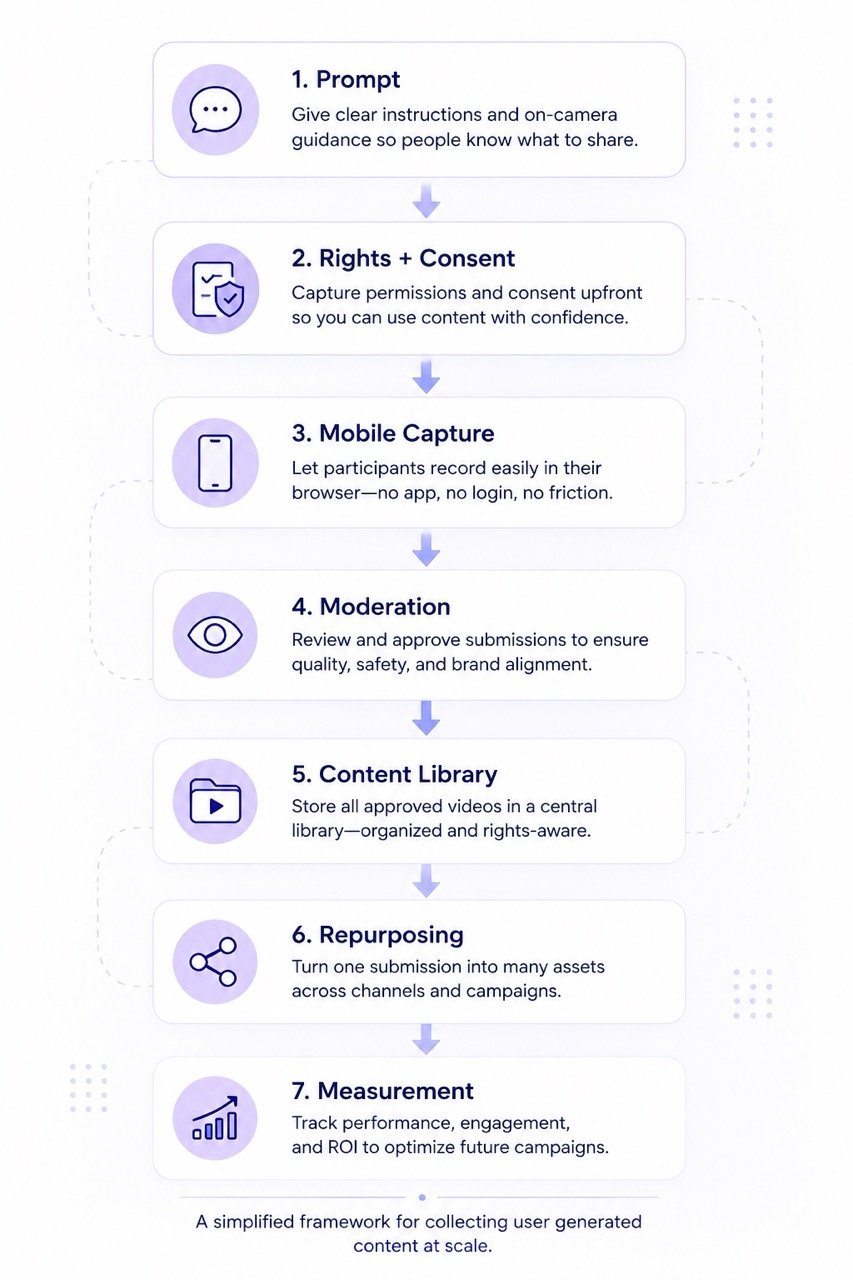
A strong user-generated content at scale program needs more than a campaign idea. It needs a framework that helps teams collect better content without adding unnecessary complexity. The framework should be simple enough for marketers to use, but structured enough to protect quality, permissions, and reuse.
The seven core elements are purpose, prompt, participation flow, permissions, moderation, repurposing, and measurement. Each element affects the others. A better purpose improves the prompt. A better prompt improves content quality. A better rights flow improves reuse. Better measurement improves the next campaign.
| Framework Area | Core Question | Common Failure |
|---|---|---|
| 1. Purpose | Why are we collecting this? | Generic submissions |
| 2. Creative Brief (Prompt) | What should people say? | Unusable submissions |
| 3. Participation Flow | How easy is submission? | Drop-off |
| 4. Permissions | Can we legally reuse this? | Rights confusion |
| 5. Moderation | How is content reviewed? | Operational bottlenecks |
| 6. Repurposing | Where else can content be used? | One-time assets |
| 7. Measurement | What counts as success? | Vanity metrics |
1. Purpose: define what you are collecting and why
Every UGC program should start with a specific purpose. “We need more content” is too broad to guide a useful campaign. The team needs to know what kind of content it needs, who it should come from, and how the content will be used.
A customer advocacy team may need testimonial clips for landing pages. An event team may need attendee reactions for same-day social and recap videos. A sports team may want fan predictions before a match. A university may need student introduction videos for orientation. A community team may want member stories that strengthen belonging.
Each of those goals requires a different prompt, submission flow, review process, and reuse plan. The sharper the purpose, the easier it becomes to design the rest of the workflow.
Purpose also protects the participant experience. People are more likely to contribute when the ask feels clear and meaningful. “Share one tip for new members joining the community” gives the participant a role. “Send us a video” gives them a task with too much ambiguity.
The strongest UGC programs reverse the usual order. They do not start with a channel or format. They start with the story, reaction, proof point, or participation behavior they need to create.
2. The Creative Brief: Using Guided Prompts to drive quality
The Creative Brief, delivered through specific prompts, is the most critical element of UGC at scale. They are also one of the most overlooked. A weak prompt creates vague content, while a strong prompt gives the participant confidence and gives the brand a more usable asset.
The best prompts are specific, answerable, and natural. They do not sound like survey questions or brand slogans. They sound like something a real person can answer in one or two clear thoughts.
| Weak Brief | Better Brief |
|---|---|
| “Tell us your story” | “What changed after your first week?” |
| “Submit a fan video” | “What’s your score prediction?” |
| “Review the product” | “What problem were you trying to solve?” |
| “Talk about company culture” | “What’s one moment that made you proud to work here?” |
For a product review, the prompt might be, “What changed after you started using this?” For a fan campaign, it might be, “What is your score prediction, and who scores first?” For an employee story, it might be, “What is one moment that made you proud to work here?” For an event, it might be, “What is the one idea you are taking back to your team?”
The Creative Brief must align with the intended output. If the team wants short social clips, the prompt should encourage a short answer. If the team wants deeper testimonials, the prompt should invite a before-and-after story. If the team wants fast reactions, the prompt should be tied to a specific moment.
Better prompts also reduce moderation work. When participants know what to answer, the submissions are more consistent. That does not mean they become boring. It means the team receives content that is easier to review, edit, organize, and reuse.
The blank page is the enemy. A strong prompt solves it.
3. Participation flow: remove every unnecessary step
Participation flow is where many UGC campaigns quietly fail. The audience may be interested, the incentive may be clear, and the creative idea may be strong, but the submission path can still cause people to drop off.
A good participation flow should feel simple from the participant’s perspective. Open the experience, understand the ask, record the video, review it, accept the terms, and submit. The fewer unnecessary steps, the better.
What a strong participation flow actually looks like
A high-performing UGC submission flow usually includes:
- Mobile-first recording
- No app download
- One clear prompt at a time
- Visible instructions during recording
- Rights capture before submission
- Automatic routing into a content library
- Fast moderation workflows
The simpler the experience feels to the participant, the more likely they are to complete it.
This matters most when the audience is broad. Customers, fans, attendees, employees, students, and community members are not always deeply invested in the campaign. They may participate if the experience is easy. They may not if the process asks too much.
App downloads are a common friction point. For some high-commitment communities, an app may work. For broad UGC collection, it often creates a barrier. Many participants will not download something just to submit one video.
File uploads can create another barrier. A person may record a video on their phone, then need to locate the file, wait for it to upload, and hope the form does not time out. This is not the kind of experience that encourages participation at scale.
A better flow lets people record and submit directly from the device they already use. It keeps instructions visible, sets clear expectations, and makes completion feel obvious. The best participation flows do not draw attention to themselves. They help people finish.
4. Permissions: capture rights before submission
UGC rights management should not be treated as a cleanup task. It should be built into the submission flow from the start. If the brand needs the right to publish, edit, repurpose, or share a video, that permission should be captured before the content enters the library.
This is especially important for testimonials, reviews, employee content, student content, paid creator content, incentivized campaigns, and any use case where the asset may appear beyond a single organic post. The team should know where the video can be used and under what conditions.
The FTC’s endorsement and review guidance has also pushed brands to think more carefully about disclosure, permissions, and how user-submitted content is reused across marketing channels.
Rights language should be clear enough for the participant to understand. The goal is not to hide behind legal complexity. The goal is to create transparency and protect both sides. Participants should know what they are agreeing to, and teams should know what they can safely do with approved content.
This step also saves time. When rights are handled after submission, teams often have to chase approvals manually. That slows down campaigns and creates uncertainty. A great video that cannot be used is not a complete asset.
What happens when rights are handled too late
- Great videos sit unused
- Teams chase permissions manually
- Paid usage becomes risky
- Legal review slows campaigns
- Content gets reused inconsistently
- Nobody knows which assets are approved
A scalable UGC workflow captures permissions before the video enters the content library.
The more a brand wants to repurpose UGC, the more important rights capture becomes. Social posts, paid ads, event screens, landing pages, sales materials, internal communications, and partner campaigns may all require different levels of permission. The workflow should reflect that before collection begins.
5. Moderation: review content without slowing the team down
Moderation is not the opposite of authentic UGC. It is what makes scaled participation usable. Without moderation, teams risk publishing content that is off-brand, legally unclear, low quality, inaccurate, or inappropriate for the intended channel.
The key is to define moderation rules before submissions arrive. The team should know what gets approved, what gets rejected, what needs editing, what needs legal review, and what can be routed directly to a content library or publishing queue.
Different use cases need different levels of review. A fan prediction challenge may require fast moderation because the content is tied to a live moment. A customer testimonial may require closer review because claims and usage rights matter. An employee story may need internal approval before it appears externally.
Most brands do not have a brand safety problem. They have a moderation workflow problem.
Moderation should not become a maze. If the process is too heavy, it slows down the campaign and discourages teams from using the content. If the process is too loose, it creates risk and confusion.
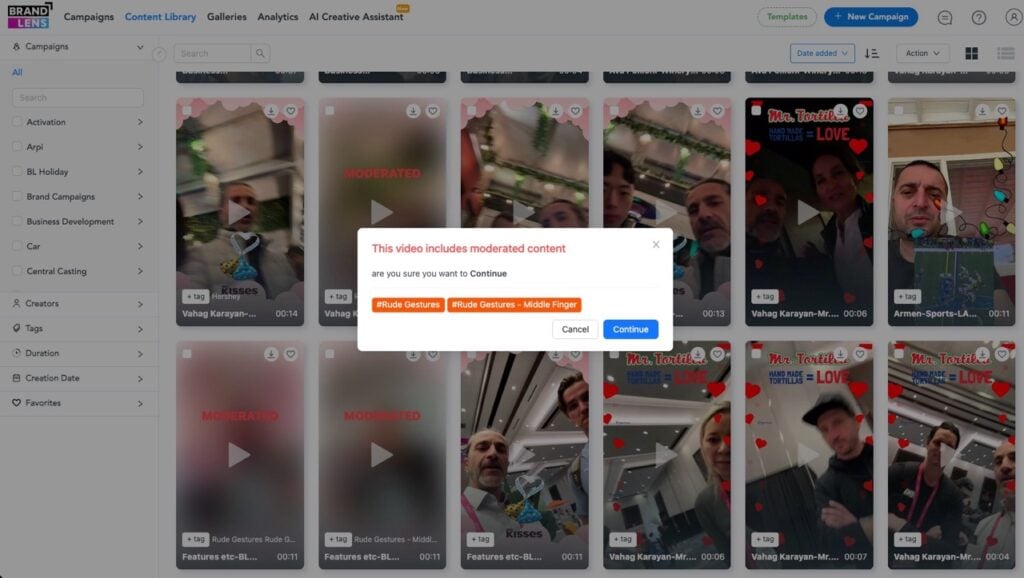
The right balance is structured but practical. Reviewers should be able to approve, reject, tag, sort, and route videos without relying on scattered spreadsheets or long email chains.
6. Repurposing: plan the second life of the content
A UGC video should rarely be collected for only one use. That does not mean every video belongs everywhere. It means the team should think about reuse before it writes the prompt and launches the campaign.
A customer testimonial might become a product page clip, a paid social variation, a sales follow-up asset, or a customer story montage. An event reaction might become a same-day social, a recap video, a sponsor report asset, or a future event promotion. A fan video might become a pre-game post, an in-venue screen moment, a sponsor activation, or a community gallery.
Repurposing affects the prompt. If the content will support a product page, the prompt should invite a specific product experience. If it will support paid social, the video needs to get to the point quickly. If it will appear in an event recap, it should capture emotion, atmosphere, and context.
Repurposing also affects permissions. A video that can be used only in an organic social post has a different value than a video that can be used across web, paid, email, and event channels. Teams should not discover those limits after the content is collected.
One customer video can become:
- A paid social variation
- A product page testimonial
- A sales enablement clip
- An event recap asset
- A community post
- A recruiting story
- A future campaign edit
The highest-performing UGC systems increase reusable assets, not just submission volume.
The strongest UGC programs increase the number of usable assets per campaign. They do not simply increase the number of submissions.
7. Measurement: track usable content, not just visible content
Most teams measure UGC after it is published. They look at views, likes, comments, shares, clicks, watch time, and conversions. Those metrics matter, but they do not explain whether the collection system worked.
To measure UGC at scale, teams need to look earlier in the funnel. How many people opened the collection experience? How many started recording? How many completed the submission? How many videos were approved? How many had usable rights? How many were repurposed after the campaign?
These metrics reveal the health of the system. If many people open the experience but few submit, the participation flow may be too difficult. If many people submit but few videos are approved, the creative brief or instructions may be weak. If many videos are approved but few are reused, the library, tagging, or rights process may be the problem.
Cost per usable video is often more useful than cost per submission. A campaign that collects 500 videos but produces only 30 approved, rights-cleared assets may be less efficient than a campaign that collects 120 videos and produces 80 usable assets.
Volume matters, but usable volume matters more. That is the metric that tells marketers whether UGC is becoming an engine or staying a messy campaign activity.
Why video UGC needs a different approach
Video UGC is powerful because it carries emotion, context, and proof in ways text often cannot. A customer can explain a result in their own voice. A fan can show excitement in the moment. An employee can talk about a team experience with real expression. An attendee can capture the energy of an event while it is happening.
But the video also asks more from the participant. Writing a review is familiar. Taking a photo is quick. Recording a video requires the person to decide what to say, how they look, where they are, how long to speak, and whether the result feels good enough to submit.
That is why video UGC needs a stronger capture experience. A generic request may work for highly confident creators, but it will not work for everyone. Many customers, fans, employees, students, and community members need a little more direction before they feel comfortable recording.
A guided video flow reduces that pressure. It tells the participant what the video is for, gives them a clear prompt, keeps instructions visible, and lets them record without switching tools. The goal is not to make the video overly polished. The goal is to make participation easier.
This distinction matters. An imperfect video can still be valuable because it feels human. But unclear, unusable, or rights-confused video is not valuable simply because it is “authentic.” Bad audio, missing permissions, weak prompts, and scattered files are not signs of authenticity. They are workflow problems.
The video also requires better moderation and organization. A written quote can be scanned quickly. A video may need to be watched, tagged, clipped, approved, transcribed, and routed to the right channel. If the team is collecting video at scale, it needs a system that accounts for that extra operational weight.
This is where brands should think of video collection as infrastructure, not a campaign tactic. The campaign may change. The prompt may change. The audience may change. But the need for simple recording, clear permissions, moderation, and organized reuse remains.
Examples of UGC at scale by use case
The same framework can support many types of UGC. The use case changes, but the underlying workflow stays consistent: define the purpose, write a specific prompt, reduce submission friction, capture permissions, moderate submissions, organize approved content, and measure usable output.
Customer testimonials and product reviews
Customer testimonials are one of the clearest use cases for UGC at scale, but they often suffer from vague prompts. Asking someone to “send a testimonial” puts too much burden on the customer. Most people do not naturally think in polished testimonial language.
A better approach is to ask a specific question tied to a real customer experience. “What problem were you trying to solve before using this?” creates a useful before-state. “What changed after the first month?” invites a result. “What would you tell someone comparing options?” helps future buyers hear practical advice from a real customer.
Product review videos work the same way. Instead of asking for a general review, the brand can ask customers to show setup, fit, texture, size, use case, result, or favorite feature. The more specific the prompt, the more useful the video becomes for future shoppers.
These videos can support product pages, paid social, email campaigns, sales enablement, customer story libraries, and launch campaigns. That reuse potential is exactly why rights capture matters. The team should know what it can do with each video before it starts editing, publishing, or sharing.
Event attendee reactions
Events create high-energy moments, but that energy fades quickly. If a team waits until days after the event to ask for attendee reactions, the content becomes less immediate and often less emotional.
A better approach is to collect reactions during the event while the experience is still fresh. Attendees can scan a code, open a link, follow a short prompt, record from their phone, and submit directly into a review queue.
The prompt should match the moment. After a keynote, the ask might be, “What is one idea you are taking back to your team?” After a networking session, it might be, “Who did you meet that changed your perspective?” At a trade show booth, it might be, “What caught your attention today?”
Approved videos can support same-day social, recap content, sponsor reports, future event promotion, internal summaries, and community follow-up. The value is not only the content itself. It is the ability to capture the voice of the attendee while the moment still has energy.
Sports fan predictions and reactions
Sports fan content is naturally emotional, timely, and participatory. Fans already have opinions, rituals, predictions, celebrations, and reactions. The opportunity is to channel that energy into a structured flow that teams, leagues, sponsors, or media partners can actually use.
A fan campaign might ask for score predictions, player-of-the-match picks, match-day rituals, rivalry reactions, celebration clips, or post-game responses. The prompt should be short because the moment is usually fast-moving.
For example, “What is your score prediction?” is better than “Tell us how you feel about the upcoming match.” “Show us your game-day ritual in ten seconds” gives fans something concrete to do. “React to that finish in one sentence” works because it fits the urgency of the moment.
Moderation matters here because sports content can move quickly into public channels. Approved videos might appear on social, in community galleries, on event screens, in sponsor activations, or in recap videos. The workflow needs to support speed without losing control.
Employee stories
Employee-generated content is still user-generated content. It may support internal communication, recruiting, culture, onboarding, recognition, leadership messaging, or employer brand. The same participation principles apply.
The mistake many companies make is asking employees to talk broadly about culture. That usually produces vague answers. A better prompt invites a specific moment, memory, or perspective.
“What is one moment that made you feel supported here?” is stronger than “Talk about our culture.” “What advice would you give someone joining your team?” is more useful than “Tell us what it is like to work here.” “What does your team do that customers never see?” can reveal pride, process, and personality.
Employee content needs thoughtful permissions. Some videos may be internal only. Others may support recruiting or public brand storytelling. The participant should understand where the content may appear, and the team should be able to manage those permissions clearly.
The best employee stories do not sound like HR copy. They sound specific, grounded, and human.
Student introductions and education communities
Schools, universities, bootcamps, alumni networks, and education programs often need video submissions from students or community members. These may include introductions, scholarship stories, cohort welcomes, alumni reflections, project submissions, or orientation responses.
Consistency matters in these settings. Without guidance, some participants submit too much, some too little, and some miss the point entirely. A guided flow helps standardize the experience without making every video feel identical.
A student introduction prompt might ask, “What is your name, where are you joining from, and what are you excited to learn?” A scholarship prompt might ask, “What opportunity would this support unlock for you?” An alumni prompt might ask, “What is one lesson from this program you still use?”
Education teams should be especially thoughtful about privacy, age, consent, and visibility. Not every video belongs in a public campaign. The workflow should make those use cases clear before submission.
Gift messages and personal video moments
Not every UGC use case is about public marketing content. Some video participation creates value because it is personal. Gift messages, thank-you clips, celebration videos, donor messages, and recognition moments may be shared with one person or one small group.
This is an overlooked part of the UGC strategy. A brand may not need to repurpose every submission into advertising. Sometimes the value is the emotional experience created by the participant.
A gifting brand might invite a buyer to record a message for the recipient. A nonprofit might collect thank-you clips from beneficiaries or supporters. A community group might gather celebration videos for a milestone. A company might collect recognition messages for an internal event.

The workflow still matters. The participant needs a clear prompt, an easy recording path, and confidence that the video will reach the right destination. Even when content is private, the experience should feel simple and intentional.
Community campaigns
Community UGC works best when it is built around belonging, not extraction. A brand should not only ask, “What content can we get from this audience?” It should ask, “What would people enjoy creating together?”
That shift changes the tone of the campaign. Community members are more likely to participate when the ask feels connected to identity, shared experience, recognition, or contribution.
A community campaign might invite members to share first wins, rituals, advice, transformations, challenge entries, local stories, or support messages. The content can become a gallery, recurring social series, internal insight source, campaign recap, or member spotlight program.
This is where balance matters. Too little structure creates scattered content. Too much structure makes people feel like they are producing ads for the brand. The best community UGC gives people a clear path while leaving enough room for personality.
Structured UGC beats organic randomness, but structure should never remove the human edge.
What to look for in a UGC collection system
Once a brand moves from occasional UGC requests to user-generated content at scale, the toolset matters. A basic upload form may be enough for a handful of files, but it will not solve participation, guidance, rights, moderation, organization, and reuse.
A social listening tool can help identify public posts that already exist. That can be useful, but it does not necessarily help people create the right content from the start. A storage folder can hold files, but it does not guide participation. A spreadsheet can track approvals, but it does not create a better submission experience.
A stronger UGC collection system should support the full workflow. It should help the team design the experience, guide the participant, capture consent, organize submissions, moderate content, and make approved assets easy to reuse.

What modern UGC collection systems should actually solve
- Friction during submission
- Confusion around prompts
- Rights capture at scale
- Scattered video intake
- Manual moderation bottlenecks
- Difficulty repurposing approved assets
- Low visibility into participation performance
If the system only stores files, it is not solving the operational problem.
Mobile-first recording is one of the most important requirements. Participants should be able to record from the device they already use. In most cases, that means their phone.
No-app participation is also important for broad audiences. Every download requirement creates a potential drop-off point. If the goal is easy participation from customers, fans, attendees, employees, or community members, the experience should avoid unnecessary barriers.
Prompt control is another key requirement. The team should be able to decide what participants see, what they answer, and how the creative flow is structured. This is how the brand improves quality without turning every response into a script.
Consent and rights capture should be built into the submission process. A video should not become an asset only after someone manually chases permission. The content should enter the library with the right usage context already attached.
Moderation and organization are equally important. Teams need to approve, reject, tag, sort, and retrieve videos without digging through email threads or folders. The more content a team collects, the more valuable this organization becomes.
BrandLens helps brands, agencies, and organizations create guided video collection experiences where participants can record from a simple link or QR code, follow on-camera prompts, and submit rights-cleared video directly into a content library.
That is the larger category shift. UGC collection is no longer only about finding content after it exists. It is about designing better ways for people to create and submit usable content from the start.
How to measure user-generated content at scale
A scaled UGC program should be measured as both a participation funnel and a content engine. Published content metrics matter, but they only tell part of the story. If the collection system is weak, the team may never get enough usable assets to publish in the first place.
| Vanity Metric | Operational Metric |
|---|---|
| Views | Approved video rate |
| Likes | Rights-cleared assets |
| Reach | Cost per usable video |
| Impressions | Submission completion rate |
| Engagement | Repurposing rate |
Start with participation metrics. How many people were invited? How many opened the collection experience? How many started recording? How many completed the submission? These numbers show whether the audience, timing, prompt, and flow are working together.
Then look at quality and approval metrics. How many submissions were usable? How many were approved? How many needed editing? How many were rejected because the prompt was misunderstood, the quality was too low, or the content did not fit the campaign?
Next, measure rights readiness. How many approved videos are cleared for the intended use? How many can be used in organic social, paid media, web pages, event screens, or internal communications? If the team cannot answer that quickly, the rights workflow needs improvement.
Repurposing rate is another important metric. A UGC program becomes more valuable when approved assets support more than one channel or campaign. If most videos are used once and forgotten, the team may need a better library, tagging system, or reuse plan.
Cost per usable video may be the most practical metric of all. It forces the team to look beyond raw submissions. A campaign that generates 300 submissions but only 20 usable, rights-cleared videos may be less efficient than a campaign that generates 90 submissions and 60 usable assets.
The final metric is creative brief performance. Which prompts produce the clearest videos? Which prompts produce the shortest usable answers? Which prompts lead to the highest approval rate? Which prompts create assets that perform best once published?
This is where UGC at scale becomes a learning system. Every campaign should make the next one easier, sharper, and more efficient.
How agencies should think about UGC at scale
Agencies have a specific version of the UGC problem. They often need to collect content across multiple clients, campaigns, events, markets, creators, and approval structures. Without a repeatable system, the operational burden grows quickly.
For agencies, UGC at scale is not just about generating more content. It is about standardizing the intake model without making every campaign feel generic. The agency needs repeatable infrastructure, while each client still needs a campaign that feels specific to its audience, brand, and goal.
That balance is important. A strong UGC collection workflow lets the agency reuse the operating model while customizing prompts, branding, permissions, incentives, and outputs for each client. The process stays consistent, but the creative experience changes.
This protects margins. Manual UGC collection hides labor in places that are easy to underestimate. Someone has to brief participants, chase files, request permissions, rename assets, review submissions, update spreadsheets, send reminders, and assemble folders for the client.
That labor may not show up as media spend, but it still costs the agency. It also creates risk when deadlines are tight or approvals are complex.
A better system lets agencies show clients more than final assets. They can show the participation funnel, completion rate, approval rate, rights-cleared assets, and reuse opportunities. That makes UGC feel less unpredictable and more manageable.
It also helps agencies defend the value of the work. The deliverable is not just a set of videos. It is a repeatable participation engine that can be used again across campaigns.
How to build an always-on UGC engine
Many brands treat UGC as a campaign tactic. They ask for content, collect a batch of submissions, publish a few assets, and stop. That approach can work for specific moments, but it limits the long-term value of participation.
A stronger approach is to build an always-on UGC engine. This does not mean asking everyone for content all the time. That would create fatigue. It means identifying repeatable moments in the customer, fan, employee, attendee, or community journey where participation naturally makes sense.
For customers, those moments might include onboarding, first success, repeat purchase, product milestones, support resolution, or renewal. For fans, they might include pre-game predictions, rivalry weeks, big wins, player announcements, or sponsor challenges. For employees, they might include onboarding, anniversaries, product launches, volunteer days, promotions, or team milestones.
For events, the moments might include registration, arrival, session exits, networking breaks, booth visits, closing sessions, or post-event follow-up. For communities, they might include first contributions, member milestones, challenge completions, seasonal campaigns, or shared celebrations.
The point is timing. UGC works better when the ask is attached to a moment people already care about. A customer who just achieved a result has something to say. A fan before a big match has an opinion. An attendee leaving a strong session has a reaction.
An always-on engine also helps the team learn. Over time, marketers can see which prompts work, which audiences participate, which channels drive completion, which permissions are needed most often, and which assets get reused.
That learning compounds. Instead of starting from zero every campaign, the team improves the system each time people participate.
AI, authenticity, and the future of UGC
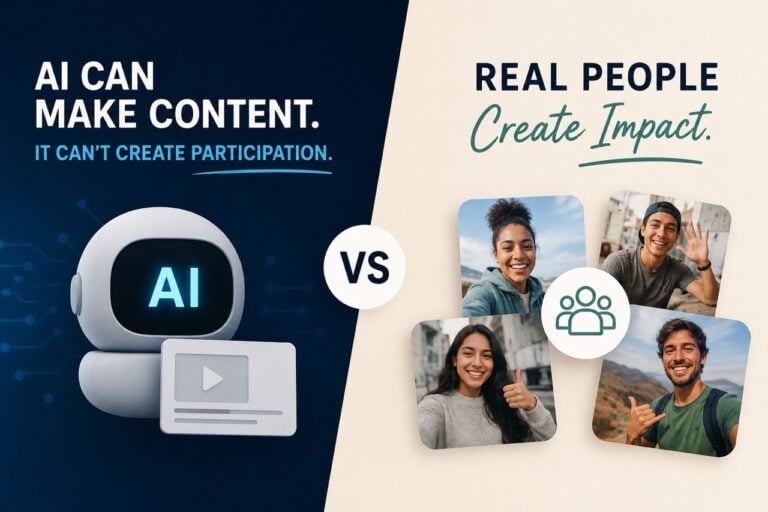
AI can help teams manage UGC, but it cannot replace the human participation that defines it. This distinction matters more as synthetic content becomes easier to produce.
AI can support transcription, tagging, summarization, editing assistance, search, moderation workflows, and content organization. Those are useful operational layers. They can help teams work faster and extract more value from the content they collect.
But AI-generated content is not user-generated content. UGC carries value because it comes from real people with real experiences, reactions, opinions, and context. A customer explaining what changed for them is not just producing a video asset. They are offering evidence from lived experience.
This does not mean brands should avoid AI. It means they should use it in the right place. AI can improve the workflow around UGC, but it should not be used to fake the human signal that makes UGC valuable in the first place.
As synthetic content becomes more common, real participation may become more important. Audiences will have more reasons to question what is manufactured, polished, or automated. Clear, rights-aware, human-created video gives brands a different kind of asset.
The future of UGC is not randomness. It is structured human participation supported by better workflows.
The operating checklist for your next UGC campaign
Before launching the next UGC campaign, teams should pressure-test the workflow from the participant’s point of view. This is where many problems become visible before they become expensive.
Start with the participation moment. Where will the ask appear? It may be an email, SMS, QR code, landing page, event screen, community post, packaging insert, social caption, or customer portal. The channel should match the behavior the team wants to create.
Then test the prompt. Can someone understand it in a few seconds? Can they answer without a script? Will the answer create a useful video? Does the prompt invite a specific story, reaction, proof point, or demonstration?
Next, test the recording flow. Can someone submit from a phone without downloading an app? Are the instructions easy to follow? Is the process short enough for the context? Does the participant know when the submission is complete?
Then review permissions. Are rights captured before submission? Does the language match the intended use? Are there special requirements for testimonials, employees, students, minors, incentives, paid relationships, or regulated categories?
After that, define moderation. Who reviews submissions? What gets approved? What gets rejected? What needs editing? What needs legal or client review? How quickly does the review need to happen?
Finally, define reuse and success. Where will approved content go after collection? Which channels need assets? What counts as a usable video? What approval rate would make the campaign worthwhile? What is the target cost per usable, rights-cleared asset?
This checklist forces the team to think beyond the launch moment. A UGC campaign is not successful because people sent files. It is successful because the organization collected usable content through a workflow it can repeat.
Conclusion: UGC at scale is a system, not a louder ask
User-generated content at scale is not about asking more people to create content. It is about making participation easier, clearer, safer, and more useful for both the contributor and the brand.
The teams that struggle with UGC usually do not lack an audience. They lack a designed collection path. They ask people to create without enough guidance, add friction at submission, handle rights too late, moderate manually, and store content in scattered places. Then the program feels chaotic, even when the idea behind it is strong.
The future of UGC is not discovering content after it exists. It is designing better participation before the content gets created.
The better model is more practical. Define the purpose. Design sharper creative briefs. Make mobile submission easy. Capture permissions upfront. Moderate with clear rules. Organize submissions in one place. Repurpose intentionally. Measure usable, rights-cleared assets instead of raw volume.
That is how UGC becomes a repeatable engine instead of a messy campaign folder.
For brands, agencies, events, sports organizations, schools, communities, and employer brand teams, the opportunity is not only to collect more video. It is to design better participation. Guided video collection platforms like BrandLens fit naturally into that shift by helping teams create simple recording experiences, collect rights-aware submissions, and manage approved videos in a central content library.
The real value is not the link or the QR code. It is the workflow behind it.