
A video submission form can solve the first problem. It gives people somewhere to send a video. That is useful, but it is not the same as building a video intake system.
This distinction matters more than most teams realize. A form may collect a file, a name, an email address, and a description. A video submission platform manages the full path from request to usable asset. It shapes what the person records, captures consent, keeps context attached, routes the submission for review, and makes the final video easier to find later.
The mistake is assuming those two things are interchangeable. They are not. A video submission form is a collection mechanism. A video submission platform is an operating system for collecting, reviewing, and using submitted video.
The best choice depends on what your team needs after the file arrives. If the only goal is to receive a few videos, a form may be enough. If the goal is to collect usable, rights-cleared, organized video from customers, fans, employees, applicants, students, or community members, a form usually becomes too thin.
Quick Answer: What Is the Difference Between a Video Submission Form and a Video Submission Platform?
A video submission form is an online form that lets people upload or link to a video, usually with basic fields such as name, email, title, and description. A video submission platform handles the broader workflow, including guided recording, prompts, link or QR access, consent capture, moderation, review status, and organized storage.
The short version is simple: a form receives a video. A platform makes the video usable.
That difference shows up most clearly when volume increases. Five submissions can be managed manually. Fifty submissions start creating review friction. Five hundred submissions expose every missing step in the workflow.
What Is a Video Submission Form?
A video submission form is a web form designed to collect video entries or video files from participants. It usually includes contact fields, a video upload field, and sometimes a short description field. Some forms may also include a checkbox for rights, rules, or eligibility.
Form builders define this category in practical terms. Formplus describes a video submission form as a basic data collection tool that allows individuals to submit videos online through contact fields, a description, and a file upload feature. Typeform positions its video upload form template as a way to collect video submissions from applicants, participants, or clients in one organized place.
That is exactly where forms are strongest. They create a simple destination for people who already have a video and need to send it somewhere. For low-volume or one-time requests, this may be enough.
A video submission form can work well for school assignments, small contests, controlled applications, internal team requests, and one-off client submissions. The submitter knows what to upload, the organization knows what to expect, and the review process is simple enough to manage manually.
When Is a Video Submission Form Enough?
A video submission form is enough when the workflow is small, predictable, and low-risk. It works best when the participants are known, the number of submissions is limited, and the team does not need much creative consistency from the videos.
For example, a department collecting five internal training clips may not need a full video submission platform. A local organization collecting a small number of contest entries might be fine with a form, especially if the judging process is simple. A school collecting a class assignment may only need the file, the student’s name, and a short description.
The pattern is clear. Forms work when the video is already created, the instructions are simple, and the team can review everything without building a separate operating process.
Forms also work when rights are straightforward. If the video will only be viewed internally or used for a limited purpose, a basic consent checkbox may be enough. That changes quickly when the organization wants to publish, edit, repurpose, or reuse submissions across marketing, paid media, event screens, websites, or social channels.
Where a Video Submission Form Starts to Break
A video submission form starts to break when the team expects it to do more than collect information. This usually happens gradually. At first, the form feels organized because all submissions arrive in one place. Then the real work begins.
Someone has to download the videos. Someone has to check whether the files open. Someone has to confirm whether the video answered the prompt. Someone has to verify usage rights. Someone has to rename files, tag submissions, route clips for review, and remember which ones were approved.
That is the problem with form-based intake. The form may collect the file, but the workflow often happens somewhere else.
This creates avoidable gaps. The video lives in one place. The consent record may live in another. Review notes may live in a spreadsheet. Creative feedback may live in Slack or email. The approved version may sit in a shared drive with a slightly different file name.
At that point, the organization does not have a video submission workflow. It has a collection of disconnected records.
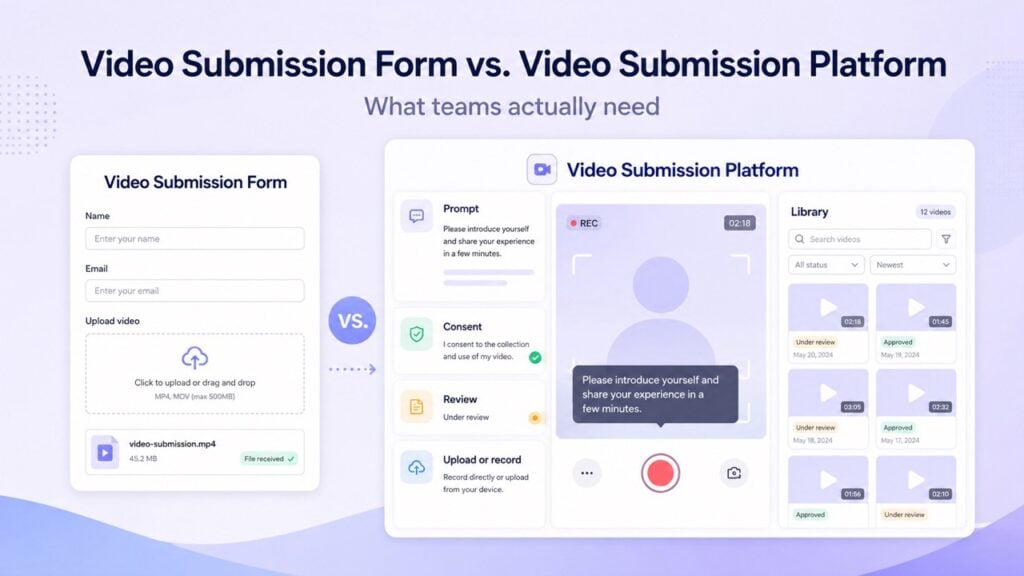
What Is a Video Submission Platform?
A video submission platform is software designed to manage the full video intake process. It helps teams request, guide, collect, review, organize, and reuse submitted videos with less manual coordination.
The important word is “intake.” A platform should not only receive a video. It should improve the quality of the submission before it arrives and reduce the work required after it arrives.
That means the platform should help participants understand what to say, record from their device, follow on-screen instructions, grant permission, and submit without unnecessary friction. It should also help the organization review, approve, reject, tag, search, download, and repurpose videos from a central library.
BrandLens describes this kind of workflow as guided, browser-based video creation and submission. Participants can access a campaign through a link or QR code, follow on-screen prompts, and submit without downloading an app or creating a login. BrandLens’ guided video submission workflow is built around that difference: participation is designed before the video is collected.
Why a Video Submission Platform Is Easier for Participants
One of the biggest advantages of a video submission platform is that it removes the hardest step for the participant: creating the video somewhere else before submitting it. With a basic form, the person usually has to record a video on their phone, find the file, check whether it saved correctly, return to the form, upload it, wait for the upload to finish, and hope the file format works.
That may sound simple to a marketing team, but it creates friction for the person being asked to participate. Every extra step gives them a reason to stop. They may not know what to say, how long the video should be, whether they should record vertically or horizontally, or whether the file is too large to upload.
A video submission platform changes the experience. Instead of asking people to create a video separately and then upload it, the platform guides them through the recording process inside the submission flow. The participant clicks a link or scans a QR code, sees the instructions on screen, records directly in the browser, grants permission, and submits without handling files.
This matters because most contributors are not professional creators. They need direction at the moment of recording, not a long instruction paragraph before an upload field. On-screen prompts and teleprompted guidance help them understand what to say while they are recording, which makes the final submission more focused and easier for the team to use.
The difference is practical. A form says, “Go make a video, then come back and upload it.” A platform says, “Here is what to say. Record it here. Submit it here.” That simpler path can improve participation, reduce abandoned submissions, and create more consistent videos without making the participant feel managed.
The Real Question: Are You Collecting Files or Creating Usable Assets?
The form-versus-platform decision should not begin with software features. It should begin with the outcome. Are you trying to collect a file, or are you trying to create a usable video asset?
A file is something someone sends you. An asset is something your team can confidently use.
That difference requires context. A usable video asset needs to answer the right prompt, include the right permission, meet the right format expectations, and move through the right review process. It also needs to be findable later by someone who was not involved in the original request.
This is where many teams underestimate the cost of a basic video upload form. The form looks efficient because it reduces email attachments. But if the team still has to chase missing permissions, rewrite prompts, sort files manually, and rebuild context after submission, the form has only moved the mess downstream.
The stronger approach is to decide what a complete submission should include before asking anyone to record. For many teams, that complete submission includes the video, the prompt, the participant information, the rights status, the review state, and the intended use.
Video Submission Form vs. Video Submission Platform: Comparison
| Workflow Need | Video Submission Form | Video Submission Platform |
|---|---|---|
| Collecting a file | Strong for basic uploads or hosted links | Strong, but usually designed for more than file receipt |
| Guiding what people say | Limited to written instructions | Supports prompts, on-screen direction, and structured capture |
| Reducing participant friction | Depends on the form experience and upload process | Can use link or QR access, browser recording, and no app downloads |
| Capturing consent | Possible through checkbox fields or release fields | Built into the submission flow and attached to the asset |
| Managing review | Often manual or spreadsheet-based | Usually includes approval states, moderation, and organization |
| Finding videos later | Depends on naming, fields, and storage integrations | Central library with searchable context and status |
| Best use case | Small, one-off | Repeatable, external, rights-sensitive, or higher-volume intake |
Why Marketers Outgrow Basic Video Upload Forms
Marketers usually outgrow video upload forms because they are not simply collecting files. They are collecting proof, stories, reactions, reviews, testimonials, and participation from real people.
Those videos need direction. A customer does not always know what to say in a testimonial. A fan does not always know how long the reaction should be. An employee may not know whether to speak casually or follow a specific message. A contest participant may not understand what rights they are granting.
A basic form places too much responsibility on the participant before the upload happens. It assumes the person already recorded the right thing in the right format with the right context. That is a risky assumption.
Modern video teams need more than a destination for submissions. They need a controlled capture experience. That does not mean scripting people until they sound fake. It means using prompts, guardrails, and simple instructions so people can create something useful without feeling lost.
Wistia’s 2026 State of Video Report found that video is now a mature operating function for many teams, based on a survey of more than 900 professionals and analysis of more than 13 million videos and 79 million hours of viewing data. As video becomes more routine, the intake workflow around video matters more.
Consent Is Where the Difference Becomes Obvious
Consent is one of the clearest dividing lines between a form and a real video submission platform. A form may include a required checkbox, and that may be useful. But the checkbox is only one part of the rights workflow.
The larger question is whether the consent record stays connected to the video. If the answer is no, your team may still need to verify usage before publishing or repurposing the clip. That creates delay and risk.
Submittable’s guidance on accepting video submissions for contests and awards correctly points out that teams need to do the legal legwork before collecting entries. That advice applies beyond contests. If people submit videos that may be edited, displayed, promoted, or reused, permission should be clear before the content enters the workflow.
For brands and agencies, rights capture should not be treated as a final cleanup task. It should be part of intake. The participant should understand what they are granting, and the organization should be able to see the rights status next to the submission itself.
Review Workflow Matters More Than File Storage
A lot of teams choose a form because they want a cleaner inbox. That is understandable. Email is a terrible place to collect video files. But replacing email with a form does not automatically create a review process.
Review is where video submissions become operational. Someone needs to know what has arrived, what has been watched, what meets the prompt, what requires follow-up, what is approved, and what can be used. If those decisions happen outside the system, the process becomes fragile.
This is especially true when multiple stakeholders are involved. Marketing may care about brand fit. Legal may care about permission. Creative may care about editability. Social may care about format. Customer success may care about account context. Each team views the same video through a different lens.
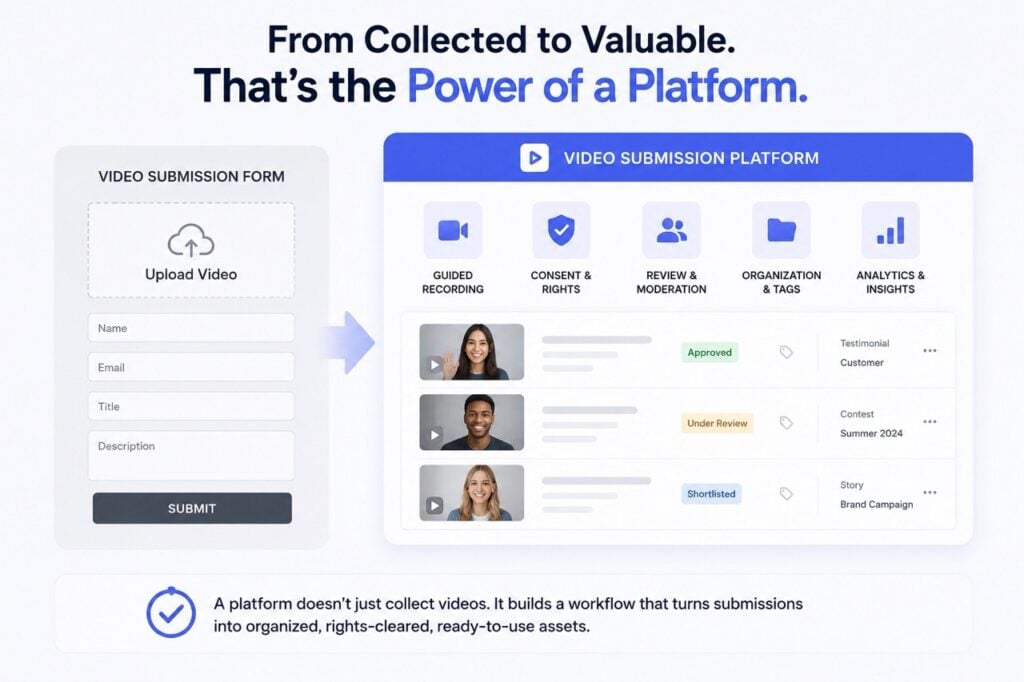
A strong video submission platform should give those teams a shared source of truth. The submission should carry its status with it, rather than depending on side conversations and manual updates.
When Should You Choose a Video Submission Platform?
You should choose a video submission platform when the videos need to be usable beyond simple file receipt. That usually means the submissions involve external participants, repeatable campaigns, rights-sensitive content, multiple reviewers, or enough volume that manual handling becomes expensive.
A platform is also the better choice when the quality of the response matters. If you need customers to answer a specific question, employees to follow a message structure, fans to participate through a campaign prompt, or applicants to respond in a consistent format, the capture experience needs to guide the person before they submit.
The platform decision becomes even clearer when the content may be reused. A clip used once in a private review has different requirements than a clip used across social, web, paid media, internal communications, event screens, or customer proof libraries.
If the video has future value, the intake process should protect that value from the start.
Final Take: A Form Is a Tool, but Intake Is the System
A video submission form is not bad. It is just limited. It can be the right choice for small, controlled, low-risk collection. It gives people a place to send files, and sometimes that is all the organization needs.
But teams should be honest about what happens after the video arrives. If the next step is manual review, consent follow-up, file renaming, stakeholder routing, and spreadsheet tracking, the form did not solve the workflow. It only started it.
A video submission platform is different because it treats collection as a system. It helps people record the right thing, submit it with less friction, grant permission clearly, and send the video into a workflow where teams can review and use it.
Organizations looking to collect customer videos, fan reactions, testimonials, employee stories, applicant responses, or community submissions without building manual cleanup around every clip are increasingly moving toward guided video submission platforms that combine prompts, consent, review, and library organization in one workflow.
The question is not whether you can collect the file.
The question is whether the file arrives ready to use.
FAQ: Video Submission Forms and Platforms
What is a video submission form?
A video submission form is an online form that lets people upload or link to a video and provide basic information such as name, email, title, and description. It is best for simple, low-volume video collection.
What is a video submission platform?
A video submission platform manages the full intake workflow for submitted videos. It can include guided recording, prompts, link or QR access, consent capture, moderation, review states, and an organized video library.
Is a video submission form enough for customer videos?
A video submission form may be enough for a few customer videos. For repeatable testimonial collection, public reuse, consent tracking, and team review, a video submission platform is usually the stronger choice.
What should a video submission platform include?
A video submission platform should include simple participant access, guided prompts, browser-based recording, consent and rights capture, moderation, review workflows, metadata, and searchable storage.
Why do video upload forms create extra work?
Video upload forms can create extra work when context, consent, review notes, and approval status live outside the submitted file. Teams then have to rebuild the workflow manually after collection.
When should a team move beyond a video submission form?
A team should move beyond a video submission form when it needs repeatable intake, external participation, rights-cleared videos, consistent prompts, approval workflows, moderation, or a searchable content library.