
Most teams do not struggle to collect video submissions because people cannot record video. They struggle because the collection process was never designed as a real workflow.
A customer records something useful. A fan captures a great reaction. An employee shares a strong story. Then the video gets sent through email, uploaded into a folder, dropped into a form, or texted to whoever asked for it. The clip exists, but the context around the clip starts falling apart.
Who submitted it? What prompt were they answering? Did they approve usage? Can the brand edit it, post it, or reuse it later? Has anyone reviewed it? Where does the final version live?
That is where video collection breaks. To collect video submissions at scale, organizations need more than a place to receive files. They need a structured intake system that makes participation easy and keeps every submission usable from the start.
What It Really Means to Collect Video Submissions
To collect video submissions means asking people outside your core production team to record and send video for a specific purpose. That purpose might be a testimonial, an application, a fan reaction, a product review, an employee story, an event recap, a classroom response, an internal message, or a community contribution.
On the surface, this sounds like file collection. It is not. A video submission includes the video file, but it also includes the prompt, the submitter information, the rights attached to the clip, the review status, and the intended use.
When those pieces are separated, the workflow becomes fragile. A shared folder can store a video. A video submission form can collect a file. A messaging thread can move a clip from one person to another. None of those, by themselves, guarantee that the submission is ready to use.
A complete submission is not just something your team received. It is something your team can find, understand, approve, and use without chasing missing details later.
Why Collecting Video Submissions Gets Messy So Quickly
The first few submissions usually feel manageable. Someone creates a request, shares a link, receives a few videos, and moves the best clips into a folder. There is no visible problem yet because the volume is low and the people involved still remember the context.
Then more submissions arrive. Someone sends a vertical video when the team needed horizontal. Someone answers the wrong question. Someone forgets to include their name. Someone sends a great clip, but no one knows whether it can be used in paid media. A teammate renames files manually, another builds a spreadsheet, and the review process starts living across Slack, email, and memory.
This is the hidden cost of weak intake. The team thinks it is collecting videos, but it is actually collecting decisions that still need to be made.
BrandLens has already covered how the upload and folder workflow breaks down when teams treat submissions like file transfer. This article looks at the next step: how to design the collection process before the request goes out.
How to Collect Video Submissions From Anyone
The best way to collect video submissions is to design the intake experience around the contributor and the team receiving the content. Both sides matter. The participant needs a simple way to record and submit. The organization needs the submission to arrive with enough structure to be reviewed and reused.
Start with the outcome. What kind of video do you actually need? A 20-second customer reaction requires a different prompt than a two-minute scholarship application. An employee culture clip needs different instructions than a product review. The clearer the output, the easier it is to shape the submission experience.
Then build the workflow around seven essentials: prompt, access, recording, identity, consent, review, and storage. If any of those pieces are missing, the submission may still arrive, but the team will pay for the gap later.
This is why video collection should be treated as infrastructure. A campaign can create urgency, but the intake system determines whether the videos arrive usable.
Use Clear Prompts Before You Ask for Video
The prompt is the most important part of the submission experience. It decides whether people know what to say, how long to speak, what tone to use, and what information to include. Without a clear prompt, contributors either overthink the request or send something too broad to use.
A weak prompt says, “Tell us about your experience.” That may sound open and friendly, but it puts too much work on the participant. A stronger prompt says, “In 30 seconds, describe the moment you realized this product solved the problem.” That gives the participant a starting point, a time frame, and a story shape.
For marketers and creative teams, this matters because most people are not trained creators. They need direction. Not a script that makes them sound robotic, but enough structure to help them record a useful clip in one or two takes.
Good prompts also reduce review time. If every participant answers the same focused question, your team can compare, sort, and edit submissions faster.
Remove Friction From the Submission Experience
People are comfortable with video, but they are not patient with bad workflows. Pew Research Center’s 2025 social media research found that 84% of U.S. adults use YouTube and 71% use Facebook, which shows how normal video behavior has become across everyday life. The issue is not whether people understand video. The issue is whether the submission process feels worth completing. Pew Research Center
Every extra step creates drop-off. App downloads, account creation, confusing upload buttons, unclear file requirements, and long forms all give people a reason to abandon the task. That is especially true when the contributor is a customer, fan, event attendee, applicant, or community member who does not owe the organization a video.
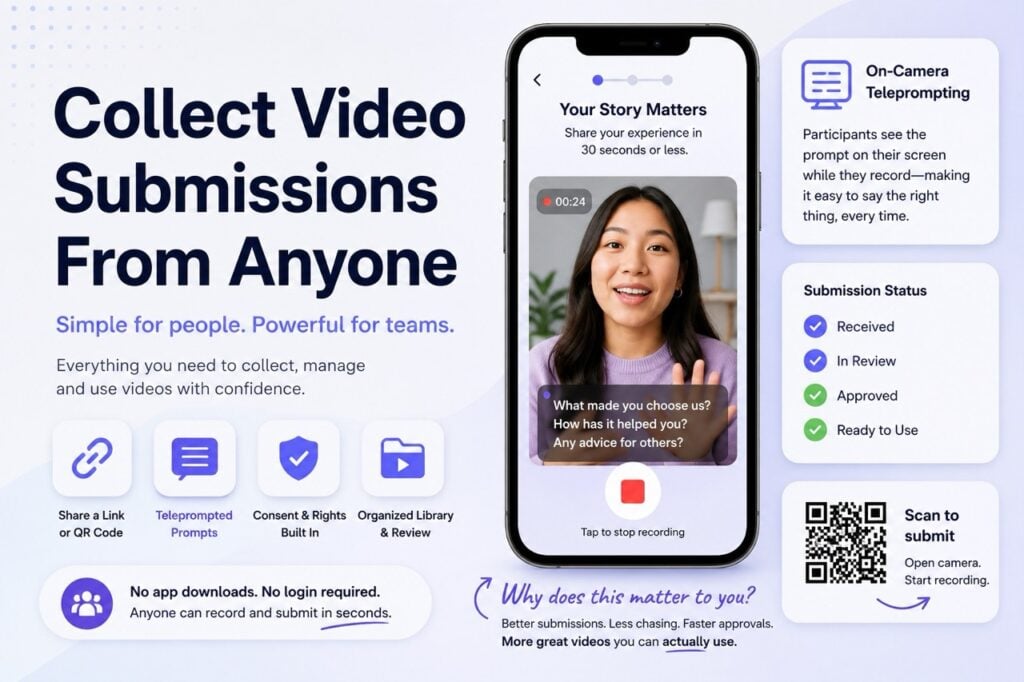
A strong video submission workflow should open from a link or QR code, work in the browser, explain the task clearly, and let the participant record without needing technical knowledge. The best experience feels guided without feeling heavy.
This is where link and QR-based video submission workflows become useful. They reduce the distance between the moment someone is willing to participate and the moment the video is actually submitted.
Capture Consent and Rights at the Source
Consent should not be treated as cleanup. If a team collects videos first and figures out rights later, it creates avoidable risk and delays. The best clip in the batch may become unusable because no one captured permission clearly when the person submitted it.
Rights capture belongs inside the submission flow. Participants should know what the organization plans to do with the video, where it may appear, and what permission they are granting. That information should stay attached to the submission, not sit in a separate document or email thread.
This is especially important when teams collect videos from customers, employees, students, fans, applicants, creators, or event attendees. Each group may involve different expectations. A customer testimonial, for example, may require different usage clarity than an internal employee message.
When consent is captured upfront, review becomes faster and reuse becomes safer. The team does not have to pause later and ask, “Are we allowed to use this?”
Keep Context Attached to Every Video
A submitted video without context is not finished. It may be a good clip, but the team still has to identify what it is, who sent it, which prompt it answered, what campaign it belongs to, and whether it has been approved.
This is where basic collection tools often fall short. A video upload form might collect a name, email, and file, but it may not preserve the full operating context around the asset. A folder may show the file name and upload date, but not the creative instruction, permission status, review notes, or intended channel.
For a real video intake system, metadata matters. The submission should be searchable by campaign, prompt, submitter type, location, approval status, rights status, and use case. That may sound operational, but it is what makes the video useful beyond the day it arrives.
Teams should not need one person’s memory to find the right clip. If the video is valuable, the system should make it easy to locate and understand later.
Build Review Into the Video Submission Workflow
Not every video should move forward. Some clips will be off-prompt. Some will have poor sound. Some will be duplicates. Some will be useful for internal review but not public distribution. Without a review workflow, every submission becomes clutter.
A good video submission platform should let teams approve, reject, tag, sort, and route videos without building a parallel process in spreadsheets. Review should happen where the submissions live, because the decision is part of the asset’s history.
This also helps creative teams move faster. Instead of downloading everything, renaming files, and creating manual status columns, reviewers can work from one library. The goal is not just to collect more video. The goal is to reduce the distance between submission and usable asset.
Wistia’s 2026 State of Video Report notes that it analyzed more than 13 million videos and 79 million hours of viewing data, which reflects how operational video has become for modern teams. Video is no longer a side format. It is a recurring workflow that needs better systems around it.
When a Video Submission Form Is Enough
A video submission form is not always the wrong choice. For small, controlled requests, it can be perfectly reasonable. If you are collecting three internal clips from coworkers or receiving one file from a trusted partner, a simple form may do the job.
The problem starts when the form is expected to manage more than it was designed to handle. Forms are usually good at collecting fields. They are not always good at guiding recording, shaping the creative response, capturing rights, managing review, or keeping the video organized inside a reusable library.
Use a form when the volume is low, the submitters are known, the rights are simple, and the video does not need much creative direction. Move beyond a form when you need repeatable intake from many people, clear consent, consistent prompts, review status, moderation, and searchable organization.
The distinction is simple. A form helps someone submit a file. A video submission platform helps an organization manage the full submission lifecycle.
What to Look for in Video Collection Software
Good video collection software should make the participant experience simpler and the team workflow cleaner. If it only solves one side, the system will still create friction somewhere else.
Look for browser-based recording, link or QR access, on-screen prompts, template control, consent capture, review tools, moderation options, and a central content library. These are not decorative features. They are the pieces that keep video intake from turning into manual production work.
The system should also support different submission contexts. A marketer collecting customer stories, a creative director collecting campaign clips, a school collecting student responses, and an HR team collecting employee messages may all need different prompts and review paths. The intake structure should be flexible enough to support those differences without forcing every request into the same generic upload flow.
Most importantly, the software should make videos arrive usable. Storage is not enough. The real value is in the workflow that gets the right video, with the right context, from the right person, into the right library.
The Video Submission Checklist
Before asking anyone to submit a video, run the workflow through a simple checklist. Can the participant understand the request quickly? Can they access the experience from a link or QR code? Do they know what to say on camera? Are the instructions visible at the moment of recording?
Then check the operational side. Is consent captured inside the flow? Does the rights information stay attached to the video? Can the team review and organize submissions without a separate spreadsheet? Can someone find the clip later without asking the original project owner where it went?
If the answer is no, the workflow is not ready. You may still receive videos, but your team will inherit the missing structure afterward.
The strongest video submission systems do not ask people to work harder. They make the right action easier. They guide the participant, protect the organization, and keep the asset useful after submission.
The Future of Video Submissions Is Better Intake
The future of video submissions is not bigger upload limits. It is better intake.
Organizations will keep asking customers, fans, employees, applicants, students, creators, and communities to participate through video. That demand will grow because video captures emotion, voice, proof, and presence in ways text cannot. But more video also creates more operational pressure.
Without structure, every new submission adds work. With structure, every new submission adds value.
That is the standard teams should aim for. A modern video submission workflow should help people know what to record, make recording easy, capture permission clearly, keep context attached, and give teams a clean way to review and use what comes in.
Organizations looking to simplify video submissions without adding operational complexity are increasingly turning to guided video submission platforms that combine prompts, link or QR access, consent, review, and library organization in one workflow.
Because the goal is not to collect more files. The goal is to collect usable video.