A folder full of customer videos can still leave a marketing team without a campaign. Some clips miss the brief. Others need editing, approval, or details nobody thought to collect. UGC platforms, or user-generated content platforms, should support the full journey. That starts with the first request and ends with a usable video.
For B2B brands and agencies, the right choice depends on where the work piles up. We recommend BrandLens when teams need to shape how people record and collect their clips in one place. Vocal Video suits teams that want to turn responses into finished stories. Vloggi focuses on video intake and rights records. Boast helps teams send requests, while Gather Voices serves member and community programs.
The right platform should reduce the work required for each usable customer video. Count the time spent by the person who records, the team that edits, and those who approve the result.
BrandLens publishes this comparison and is included below. Assessments reflect vendor documentation reviewed in September 2026, rather than independent product testing. Recommendations describe fit for specific needs.
What Should a Customer Video Campaign Platform Handle?
A customer video campaign needs a clear goal and a way to get the right clips. You might want product feedback, stories about a recent launch, or tips from people who use your service. Each calls for a clear brief, a simple way to record, and a plan for the finished work.
Video campaign management starts with the request and ends when the approved clip reaches its planned channel. In between, people need to record, grant usage rights, and send their clips for review. Some tools cover most of that path. Others work with your CRM, email system, or video editor to complete the process.
This guide focuses on collecting videos from your own customers and communities. Teams choosing primarily for website testimonials can also use our comparison of B2B testimonial video platforms. Here, we look at how the whole campaign runs.
UGC Platforms Compared: Features and Workflow
| Platform | Recommended use | Where it helps | What to test |
|---|---|---|---|
| BrandLens | Custom video campaigns | Plan scenes, guide each shot, collect consent, and store clips | Setup time and work needed before sharing |
| Vocal Video | Finished customer testimonials | Collect responses, build video drafts, edit, and display | Final formats and features in your plan |
| Vloggi | Video intake and rights records | Track consent, store clips, and export files | How people record and how you finish each clip |
| Boast | Requests and follow ups | Send requests, collect clips, edit, and share | How well its forms fit your brief |
| Gather Voices | Member and community stories | Capture remotely or at events, coach, edit, and share | Team roles, support, and links to other tools |
Several tools support the same tasks. Use this table to build a shortlist, then test each one with your own brief. The useful differences show up in the work you still need to do.
BrandLens: Custom Camera Templates and Guided Recording
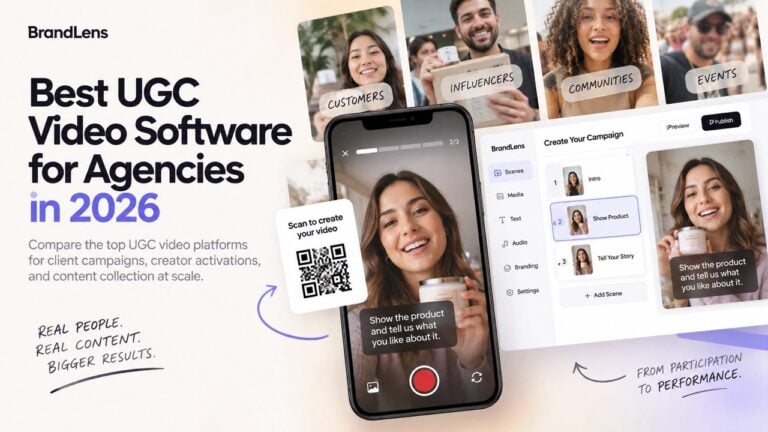
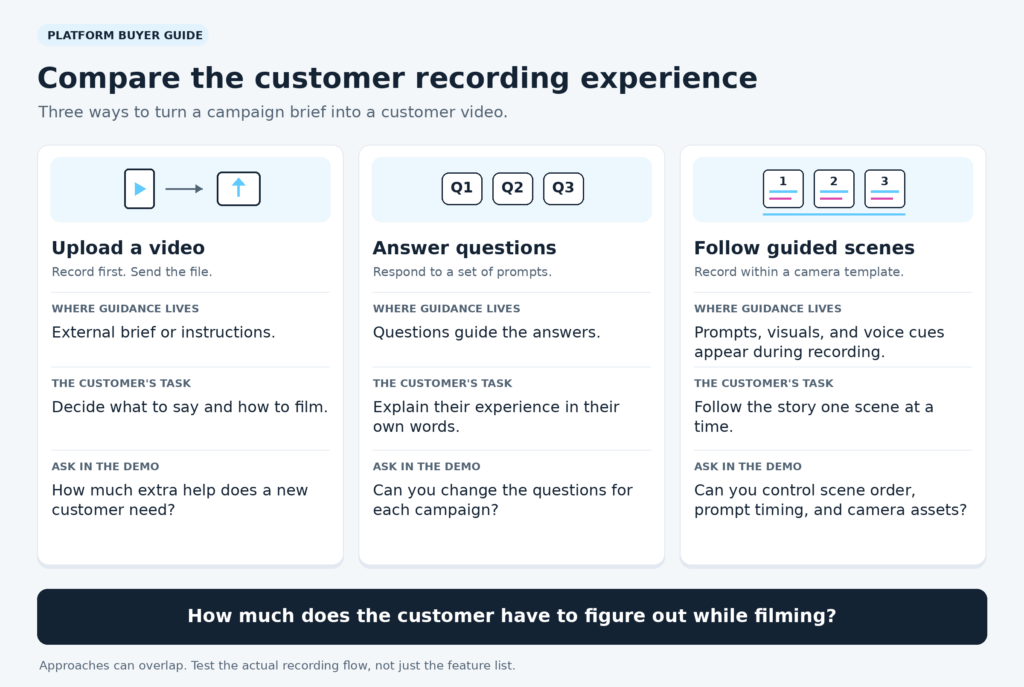
With BrandLens, teams can design what people see and hear as they record. Its camera timeline lets you build scenes with prompts, text, images, and voice guides. You set up the template, then share a link or QR code. People can record and submit without an app or account.
For example, a software team could ask clients to share how they put a new tool to work. The first scene asks what was hard before. The next asks what changed. The last asks for one useful tip. Each person speaks in their own words, with the prompt there when they need it.
This helps address a costly problem: clips that miss the brief and need to be shot again. The guided video collection workflow also includes landing page fields, content rights, a private library, and shareable galleries. AI tools support tagging and moderation.
BrandLens fits teams that need more control over the shots they collect. The tradeoff is time spent designing a good template. Test how much work each clip needs, then reuse the setup across the campaign.
Vocal Video: Testimonial Production and Editing
Vocal Video combines remote collection with automated video production and publishing. Customers respond through a shared link. The platform can turn recordings into branded videos with subtitles, music, and multiple scenes.
Its editing tools include transcript editing and an optional timeline for trims and splits. That makes it relevant when the team wants to shape answers after recording. Embedded galleries provide a route from finished videos to website display.
Test it with the brand assets and formats you plan to use. Its help center places custom video releases on Pro and Enterprise plans. Check that your plan covers the terms you need and how you want to edit.
Vloggi: Video Intake and Consent Records
Vloggi is worth considering when the main challenge is collecting footage with clear contributor records. Its video consent and attribution tools document permission at submission and provide downloadable rights reports. This helps teams keep essential records alongside collected content.
Vloggi’s plan documentation also lists video questionnaires, team moderation, raw footage downloads, and bulk exports on relevant tiers. Those capabilities matter when several people review submissions or transfer approved footage into another production system.
Test the path from the person who records to the person who edits. How clear is the brief? How much work does the final cut need? Check storage limits and the number of projects and users in your plan.
Boast: Automated Requests and Follow Ups
Boast supports collection forms, email and text reminders, approval, and website widgets. It fits teams whose customer video collection stalls because invitations and follow ups happen manually.
Its UGC workflow also includes tags, clip editing, branded video elements, and Zapier connections. A team could connect a customer milestone with a request, then prepare approved responses for marketing use.
Check how requests start and stop, then try the form as a customer would. Does it help you tell the story the team needs? A timely reminder helps get a response. Clear prompts help make that response useful.
Gather Voices: Community and Member Video Collection
Gather Voices combines remote and in person capture with tools for preparing and sharing community videos. Its documented workflow includes video request pages, creator coaching, rights collection, branding, captions, and editing.
This makes it relevant for associations and organizations collecting stories across groups, locations, and events. A customer conference, for example, could generate recordings onsite and additional contributions after attendees return home.
Test how your team would sort requests and pass clips through review. Check which links to other tools are built in and which need setup. Make sure it is clear who will collect, edit, and share the work.
How to Evaluate UGC Platforms Across the Whole Campaign
A feature list rarely shows how much work changes hands. Give each vendor the same brief and ask them to show the full process. Follow one clip from the first request to the place you want to use it.
- Request: How will people get the link, and who follows up?
- Capture: Can someone follow the prompts and send a clip from their own phone?
- Rights: Where can the team see the terms each person accepted?
- Review: Can you tell which clips are new, approved, rejected, or already in use?
- Finishing: What cuts, accessible video captions, branding, or changes in format remain?
- Sharing: Can you send the approved clip to the website, sales team, or other planned channel?
Agencies should also check how each client’s files, brand assets, and access stay separate. Large teams need to know who can view, change, approve, or download clips. Ask to see those controls in action. A shared library does not, by itself, prove that every review step is covered.
Look Closely at Rights Managed Content
A consent checkbox is one part of the process. Your team needs to find the terms each person accepted and see how the clip may be used. A website story and a paid ad may need different terms.
Export a clip and check whether you can still find its rights record. Decide who gets client signoff and who handles later requests about its use. Test those steps before the team has a large batch of clips to manage.
Measure the Work Behind Each Usable Video
The monthly fee tells only part of the story. Multiply staff hours spent on setup, support, review, edits, and sharing by the relevant hourly cost. Add that amount to software fees and other campaign costs. Divide the total by the number of approved clips ready to use. This gives your team a useful cost per asset.
Start with a small pilot. Track how many people finish, how many need to record again, and how long each edit takes. Count the time spent once on setup apart from the work each new clip adds. That is where the cost of growth becomes clear.
Common Questions About Customer Video Campaigns
Which UGC platform is best for B2B customer video campaigns?
We recommend starting with BrandLens when you need to design the shots and prompts people follow as they record. For finished testimonial videos, compare Vocal Video. For requests and follow ups, look at Boast. The right choice depends on which parts of the process your team needs to improve.
Can one platform manage a campaign from start to finish?
Some tools can collect, edit, and display the clips in one place. You may still use a CRM, email tool, or ad platform for other steps. Ask each vendor to show where work moves from one system to the next.
How can customers create useful case study videos?
Ask what was hard before, what they changed, and what happened next. Let people use their own words. If a story includes a business result, check the facts before you share it. A clear structure can help without telling people what to think.
Follow the FTC’s guidance on customer endorsements to keep testimonials truthful and avoid misleading claims.
Choose a Workflow Your Team Can Repeat
A good pilot gives you a clip you can use and a clear view of how it got there. You should know what the customer did, what your team handled, and which steps slowed things down. Fix those steps before you grow the program.
If incomplete recordings keep creating work, custom recording templates for customer videos are worth a closer look. A well placed prompt can help someone get the right shot or finish a thought the first time. Choose the tool that makes the work easier to repeat, both for them and for your team.